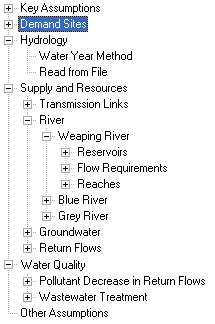
The tree is a hierarchical outline used to organize and edit the main data structures in a WEAP analysis. You can edit the tree structure underneath the branches for Demand Sites, Key Assumptions, and Other Assumptions (by right-clicking with the mouse on a tree branch, or by using the Tree menu options), and you also click on the tree to select the data you want to view and edit. (See Editing the Tree for details.) You cannot add or remove schematic nodes (e.g., reservoirs, wastewater treatment plants) by editing the tree; all schematic changes must be done through the Schematic View.
To find a branch in the tree by its name, go to Edit, Find Branch, or hit Control-F. Partial words are fine, and the search is not case sensitive. If you give multiple words, WEAP will search for branches that include all words (e.g., butte creek), unless you include OR (e.g., butte OR creek). To exclude terms precede with a minus (e.g., butte -creek). Hit F3 (or Edit, Find Again) to repeat the search using the same search text. If the bottom of the tree is reached without finding a match, WEAP will wrap around to look from the top of the tree.
You can also Bookmark up to 9 branches on the tree so that you can instantly jump to their location. To set a bookmark, select the branch on the tree and press Shift-Control-#, where # is a number from 1-9. To jump to a previously bookmarked branch, press Control-#. You can also access these functions on the main menu (Tree, Bookmarks), which also lets you clear all bookmarks, and copy the current list to the Windows clipboard.
Data in the tree are organized under six major categories, which appear
as the top level of branches in the tree:
Key Assumptions: under which you create and organize independent variables used to "drive" the calculations in your analyses. Driver variables are not directly calculated in WEAP, but they are useful as intermediate variables that can be referenced in your modeling calculations. It is very useful to create variables here for all you major modeling assumptions, especially those that will vary from scenario to scenario. Less important intermediate variables should go under Other Assumptions (see below).
Demand Sites: Demand analysis in WEAP is a disaggregated, end-use based approach for modeling the requirements for water consumption in an area.
Hydrology: under which future inflows for each supply source are projected using either the Water Year Method or the Read From File Method. You specify the details of these two methods under the Hydrology section.
Supply and Resources: given the monthly supply requirement from Demand and definitions of Hydrology, the Supply and resources section determines the amounts, availability and allocation of supplies, simulates monthly river flows, including surface/groundwater interactions and instream flow requirements, and tracks reservoir and groundwater storage.
Environment: the Environment section tracks pollution from generation to treatment to its outflow and accumulation in surface and underground bodies of water.
Other Assumptions: user-defined intermediate variables are created, similar to Key Assumptions (see above). Note: You can change the name of the Other Assumptions branch.