(These parameters apply to the MABIA Method. For the Simplified Coefficient Method, see Simplified Coefficient Method, Land Use; for the Soil Moisture Method, see Soil Moisture, Land Use; for the Plant Growth Method, see Plant Growth Method, Land Use.)
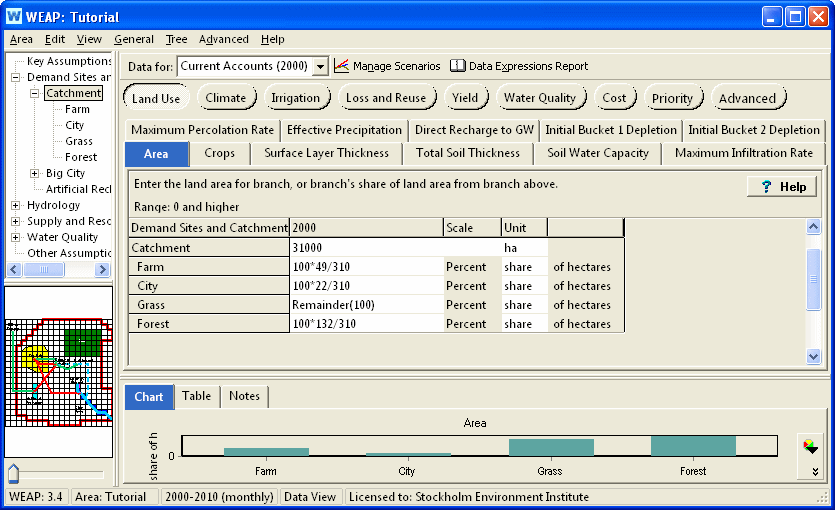
The land area for a catchment or subcatchment, or the share of land area from the branch above. Note: You can use WEAP's Automatic Catchment Delineation to help you calculate catchment area.
If you want to plant different crops on the same piece of land in different years (crop rotation), you can do this with two different branches under the catchment. For example, if you wanted to plant corn in even years and beans in odd years, create two branches (Corn and Beans) underneath the Catchment branch. Enter the actual area for the Area variable on the catchment branch, and set the unit to percent share for the Corn and Beans branches. Use the Step function to alternate between 0% and 100% for each branch:
Each catchment branch represents a piece of land on which one or more crops is planted each year. For each branch, you need to specify which crop or crops (from the Crop Library) are planted and the planting date. Given the planting date and the crop stage duration, WEAP can determine the end date. All days before the planting date or after the harvest date will use the characteristics of the crop named "Fallow" (in the Crop Library). Use the Crop Scheduling Wizard to choose crop and planting date, or choose one of the crop/planting dates already specified on another branch. Both of these options are available on the drop-down menu in the data grid. There is also an option here to view or edit the Crop Library. The expression created by the Crop Scheduling Wizard will use the CropLibrary function. It is not possible to edit the expression directly in the data grid cell -- use the Crop Scheduling Wizard instead.
For perennial crops and land covers, choose the first day of the water year as the planting date, and make sure that the end date is the last day of the water year. If not, edit that crop in the Crop Library so that the stage lengths add up to 365 days.
Many crops grown for forage or hay receive multiple harvests during the growing season. Each harvest essentially terminates a “sub” growing season and associated Kcb curve and initiates a new “sub” growing season and associated Kcb curve. The resulting Kcb curve for the entire growing season is the aggregation of a series of Kcb curves associated with each sub cycle. To handle this situation, the crop library has different entries for the first cutting and subsequent cuttings. (Search for alfalfa in the crop library to see an example.) Specify multiple crops (in the Crop Scheduling Wizard) for a particular branch, where the first crop chosen is that for the first cutting, and the second (and third) crop is for the crop specifying the subsequent cutting's parameters.
Specify the water holding properties of the soil, including saturation, field capacity and wilt point. The available water capacity (AWC) will be field capacity minus wilt point. You have four options for specifying these parameters (all available on the drop-down menu in the data grid):
Enter soil properties directly: a window will appear into which you enter the saturation, field capacity and wilt point, and fraction of coarse fragments (if any).
Choose from Soil Library: this will add the SoilLibrary function to the expression with the chosen texture class. Optionally, you can specify the fraction of coarse fragments. See the SoilLibrary function for more information.
Use the Soil Profiles Wizard: a window will appear for entering, importing, or pasting information about one or more soil profiles, each containing one or more soil horizons (layers). Various pedotransfer functions are available for estimating soil water capacity. See Soil Profiles Wizard for details.
Paste an array of data (e.g., copy several rows and columns of data from Excel onto the Windows clipboard, and paste it into the data grid) representing soil profile data. A Paste Special wizard will appear to help you format the information.
If the soil properties of one branch are the same as those of another branch, you can copy and paste the expression from one branch to another.
Average land slope in degrees (0 = completely level, 90 = completely vertical). Filled in by automatic catchment delineation. Not used in calculations, although could be used in an expression to help set Maximum Infiltration Rate or Effective Precipitation.
Depth of surface layer subject to drying by evaporation. If blank, will default to 100 mm.
Combined depth of buckets one and two. The depth of bucket one is the rooting depth of the crop; the depth of bucket two is Total Soil Thickness - Rooting Depth. Only used if using two buckets for the MABIA water balance calculation.
Amount of water that can infiltrate into soil over 24 hour period, and will vary according to soil type, slope, and rain intensity. If daily precipitation or irrigation exceeds this rate, the excess will run off. Leave blank for no restriction (unlimited flow rate).
Amount of water that can percolate from soil to groundwater over 24 hour period. This will limit Direct Recharge to GW from ineffective precipitation or inefficient irrigation. Leave blank for no restriction (unlimited flow rate).
The percentage of precipitation available for evapotranspiration. The remainder is direct runoff or direct recharge to groundwater, unless constrained by Maximum Percolation Rate. If 100% available, leave blank.
Effective fraction of soil surface covered by vegetation. If blank, Fc will be calculated by standard equation: Fc = [ (Kcb - Kc min) / (Kc max - Kc min) ] ^ (1 + 0.5 * Crop Height[m])
Of the precipitation NOT available for evapotranspiration (100% - Effective Precipitation), the percent that goes directly to groundwater recharge unless constrained by Maximum Percolation Rate (the remainder goes to surface runoff). Especially useful in karstic areas.
Initial value of soil moisture depletion. Zero depletion corresponds to field capacity. The maximum depletion is the available water capacity, as specified under Soil Water Capacity (above).
Initial value of soil moisture depletion for the lower of two buckets. Zero depletion corresponds to field capacity. The maximum depletion is the available water capacity, as specified under Soil Water Capacity (above). Only used If using two buckets for the MABIA water balance calculation.
See also: MABIA Calculation Algorithms
Entered on:
 Data View, Branch: Catchments, Category: Land Use, Tabs:
Area, Crops, Soil Water Capacity, Surface Layer Thickness, Total Soil
Thickness, Maximum Infiltration Rate, Maximum Percolation Rate, Effective
Precipitation, Direct Recharge to GW, Initial Depletion.
Data View, Branch: Catchments, Category: Land Use, Tabs:
Area, Crops, Soil Water Capacity, Surface Layer Thickness, Total Soil
Thickness, Maximum Infiltration Rate, Maximum Percolation Rate, Effective
Precipitation, Direct Recharge to GW, Initial Depletion.